
Guides
Can You Download a TikTok Slideshow?
Not as a video, because there isn't one. A TikTok slideshow is a set of photos and a sound, played by the app. What the sites that hand you an MP4 are really doing, what Arca's TikTok tools return, and the two routes that actually work.
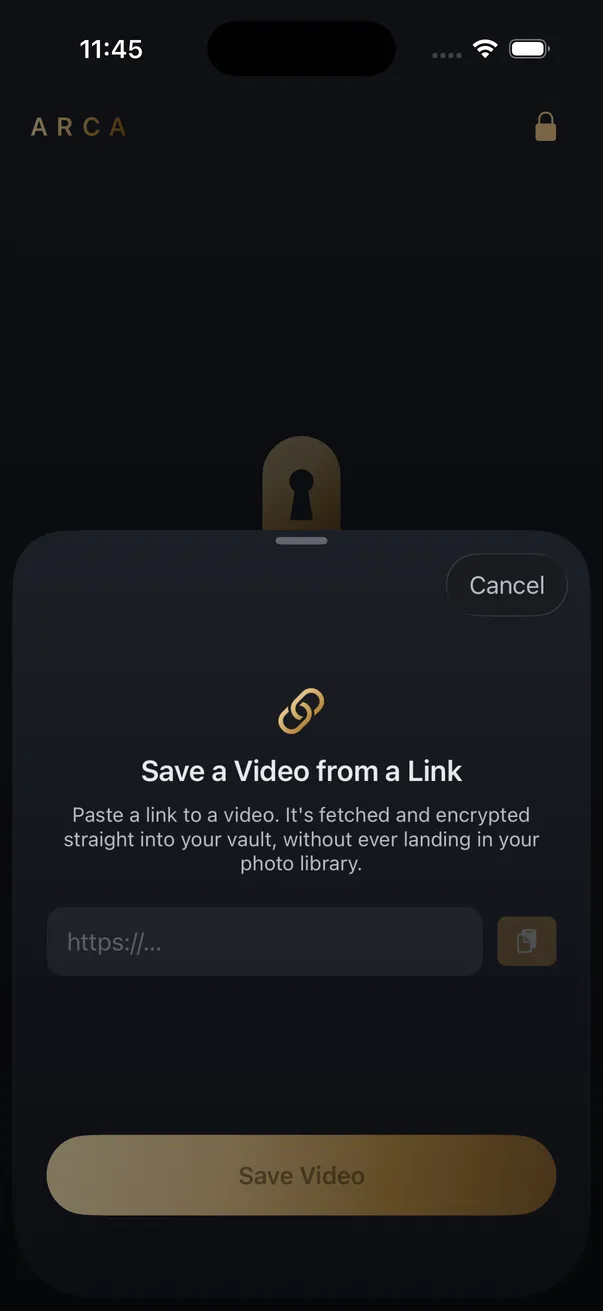
Not as a video, because there isn’t one. A TikTok slideshow is a photo post: a set of images and a sound that the TikTok app plays in sequence. There is no MP4 to fetch, so any downloader that hands you one has rendered it. Arca’s TikTok tools take one video per link and report a photo post as unsupported.
Why a slideshow is not a video
A regular TikTok post is a video file. TikTok stores an H.264 MP4 and streams it to you, which is why a downloader can return it untouched, at the resolution TikTok serves. The TikTok downloader page does exactly that.
A photo post is different. TikTok stores the images as separate files and the sound as a separate track, and the app assembles the slideshow on your screen, advancing on a timer or on your swipe. Nothing on TikTok’s side is a video of that playback. Ask a downloader for the video and the honest answer is that there isn’t one to give.
What a slideshow downloader is really handing you
The sites that promise a slideshow as MP4 build one. The images are stitched together at an interval the site picks, the sound is laid underneath, and the result is encoded as a new file. It plays, but it is the site’s video, not the creator’s. The pacing is a guess, swipe-timed slides become fixed ones, and the whole thing has been through an encoder once more than it needed to. Some sites add their own logo while they are at it.
The rest of the trade is the usual one for a free downloader. Your link goes to their server, the images pass through it, and the file arrives in a shared Downloads folder. Are free video downloader sites safe? covers what that means in practice.
| What you paste | What you get |
|---|---|
| Regular TikTok video | The MP4 as TikTok serves it, no re-encoding |
| Photo post, Arca’s TikTok page | Not supported, one video per link |
| Photo post, Arca’s Save from Link | ”Couldn’t find a video at this link.” |
| Photo post, a rendering site | An MP4 the site built, pacing and quality theirs |
| Your own photo post | The originals, already in your library |
The two routes that actually work
If the slideshow is yours, you already have it. The photos are in your library and you can add them to the vault as photos, with the sound kept separately if it matters. No download, no third-party server.
If it is someone else’s public post and you have a reason to keep it, the choice is between TikTok’s own share sheet, when the creator has left saving on, and a screen recording. A recording captures the slideshow exactly as it played, with the timing and sound the creator set, which is closer to the real thing than any render. Screen recording vs downloading walks through the trade-offs. The recording lands in your Camera Roll, so move it into the vault and delete the original if it should stay private.
The rights question does not change with the format. Save what you have the right to keep: your own posts, content published under a licence that allows it, or something the creator has agreed to share. TikTok’s terms still apply to you either way.
Where a TikTok video ends up in Arca
For ordinary TikTok videos, Arca’s Save from Link takes the link, fetches the MP4 as TikTok serves it, and encrypts it on the phone with AES-256-GCM under a key derived from your PIN with Argon2id. The file never passes through the Camera Roll, there is no account and no cloud copy, and the vault protects it at rest. Save from Link is part of Arca’s paid tier. The limits are the ordinary ones: nothing is recoverable if you forget your PIN, and an open vault in front of someone is not protected by any of this. Paste a photo post and the app says so plainly rather than inventing a video that TikTok never had.
Frequently asked questions
Can Arca download a TikTok photo post? +
No. The TikTok downloader page and the app's Save from Link take one video per link. A photo post has no video file behind it, so the page lists it as unsupported and the app reports that it couldn't find a video at this link.
Why do some sites give me an MP4 of a slideshow? +
They build one on their server. The photos are stitched together at a fixed interval, the sound is laid underneath, and the result is encoded as a new video. It is their file, not TikTok's, so the timing and quality are theirs too.
What is the best way to keep a slideshow I posted myself? +
You already have it. The photos are in your library, so add them to the vault as photos and keep the sound separately if you need it. There is no download step, and nothing passes through a third-party server.
Keep reading

Guides
Can You Download a Whole Instagram Carousel?
Yes, but not as one file. A carousel is several separate photos and videos behind a single URL, so a downloader returns them as items you pick from. What each slide type gives you, and why the sites promising a one-click zip are building it themselves.
Guides
Which Link Should You Copy to Download a Video?
Whatever the Share menu hands you, tracking tail and all. The links that fail are failing for a different reason: they point at a playlist, a profile, or something behind a login. Here is the shape each platform expects.
Guides
Can You Save a TikTok as a Live Photo?
Yes, but not with a downloader. TikTok's share sheet exports a Live Photo, and that is the only file iOS will accept as an animated Lock Screen. A downloaded MP4 is a video, and the wallpaper picker will never see it.
Your photos. Truly private.
Keep your photos in an encrypted vault on your iPhone, with no Arca account or automatic vault upload.
Free to download · iPhone · iOS 18+