
Guides
Can You Save a TikTok as a Live Photo?
Yes, but not with a downloader. TikTok's share sheet exports a Live Photo, and that is the only file iOS will accept as an animated Lock Screen. A downloaded MP4 is a video, and the wallpaper picker will never see it.
Yes, but not with a downloader. TikTok’s own share sheet has a Live photo option, and that is the only route that produces a real Live Photo. A downloaded MP4 is a video file, and iOS will not accept a video as a Lock Screen wallpaper. The Live Photo lands in your Camera Roll.
Why a downloaded MP4 cannot be your wallpaper
An animated Lock Screen comes from a Live Photo, which is a still image with a short burst of motion attached to it. iOS files that as one photo. A video is a different thing, and Settings offers no route from an MP4 to a wallpaper, because the picker only shows what is in your photo library.
The format is the whole problem. The TikTok downloader returns the MP4 as TikTok serves it, full vertical resolution, no watermark, nothing re-encoded. That is the right file to keep and watch. It is the wrong file for a wallpaper.
The route that works
TikTok exports Live Photos itself:
- Open the video and tap Share.
- Choose Live photo. TikTok renders it into your Photos app, in a Live Photos album.
- Open Settings, then Wallpaper, then Add New Wallpaper, then Photos, then Live Photo, and pick it. Opening it in Photos and tapping Use as Wallpaper does the same job.
- Check the Live Photo toggle is on before you set it, or it sits there as a still.
If Live photo is missing from the share sheet, the creator has turned saving off for that video. That is their setting.
What each route actually gives you
| Route | What you end up with |
|---|---|
| TikTok Share, Live photo | A Live Photo in the Camera Roll, usable as wallpaper |
| Arca’s TikTok page | The MP4 as TikTok serves it, no watermark |
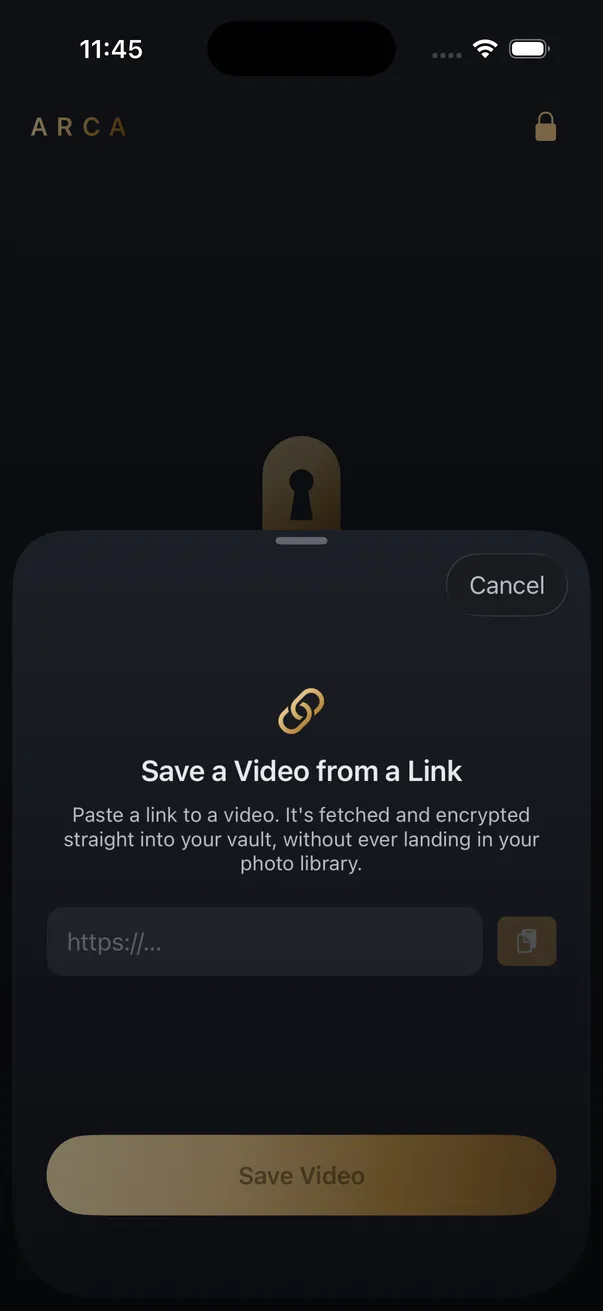
| Arca’s Save from Link | The MP4 encrypted in the vault, never in the Camera Roll |
| Screen recording | A video in the Camera Roll, not a wallpaper |
The Camera Roll part nobody mentions
A Live Photo has to sit in your photo library, because that is where the wallpaper picker looks. For a wallpaper that is fine, since a wallpaper is public by definition. The rest of the library is the part to think about. Everything in it is readable by every app you have granted photo access, syncs to iCloud when iCloud Photos is on, and can resurface months later in Memories, in a widget, or in a shared album. Where downloaded videos go on iPhone covers the rest of that. Saved videos you would rather not explain are not wallpapers, and the same tap drops them in the same place.
When you want the video, not the wallpaper
Arca’s Save from Link takes a TikTok link and pulls the MP4 into the vault, encrypted on the phone with AES-256-GCM under a key derived from your PIN with Argon2id. No Arca account or automatic vault upload, and the file never passes through the Camera Roll. It is part of the paid tier, and it saves video. Arca makes no Live Photos, so a wallpaper is not something the vault can hand you. The security page sets out what the model covers and what it does not: files at rest, not an unlocked vault held open in front of someone, and nothing recoverable if the PIN is gone.
The rights question does not change. Keep what you have the right to keep: your own posts, content licensed to allow it, a public post saved for your own offline use. TikTok’s terms still apply to you, and none of this reaches private accounts or anything behind a paywall.
Frequently asked questions
Can Arca turn a TikTok into a Live Photo? +
No. Save from Link saves video, and the MP4 goes into the encrypted vault. A Lock Screen wallpaper has to come out of your photo library, so TikTok's own Live photo export is the route for that one.
Why is the Live photo option missing on some TikToks? +
Saving is the creator's setting. When a creator turns downloads off, the share sheet drops the save options and Live photo goes with them. There is no way around that, and there should not be.
Will the wallpaper play the sound? +
No. An iPhone Lock Screen never plays audio from a wallpaper, whatever the file carries. If the sound is the reason you wanted it, you want the video file instead.
Keep reading
Guides
Can You Download a TikTok Slideshow?
Not as a video, because there isn't one. A TikTok slideshow is a set of photos and a sound, played by the app. What the sites that hand you an MP4 are really doing, what Arca's TikTok tools return, and the two routes that actually work.
Guides
Which Link Should You Copy to Download a Video?
Whatever the Share menu hands you, tracking tail and all. The links that fail are failing for a different reason: they point at a playlist, a profile, or something behind a login. Here is the shape each platform expects.

Guides
Can You Download a Whole Instagram Carousel?
Yes, but not as one file. A carousel is several separate photos and videos behind a single URL, so a downloader returns them as items you pick from. What each slide type gives you, and why the sites promising a one-click zip are building it themselves.
Your photos. Truly private.
Keep your photos in an encrypted vault on your iPhone, with no Arca account or automatic vault upload.
Free to download · iPhone · iOS 18+