
Guides
Where Do Downloaded Videos Go on iPhone?
Three different places, depending on how you saved it, and they have very different privacy consequences. Here's how to find a video you've lost and how to decide where the next one lands.

Three possible places, depending on how you saved it. Safari downloads go to Files, usually the Downloads folder. Anything you save with the share sheet goes into Photos. A video fetched by an app often stays inside that app. The route you took decides where it is, and who else can see it.
The short answer
There is no single downloads folder on iPhone, which is why this question gets asked so often. The file went somewhere specific, and which somewhere depends on the path it took to arrive.
That’s mildly annoying when you’re hunting for a video you saved last week. It matters considerably more than annoyance when the video is one you’d rather not have surface while someone is scrolling your photos, because two of those three destinations are shared, searchable, and frequently synced to a server.
The three places a video can land
Each destination behaves differently once the file is there.
| Where it lands | How it got there | Also visible in | Syncs to |
|---|---|---|---|
| Files, Downloads folder | Safari download | Files search, Spotlight | iCloud Drive, if that’s the chosen location |
| Photos, your library | Share sheet, Save Video | Recents, Memories, People, shared albums | iCloud Photos, if enabled |
| Inside an app | App fetched it itself | Nothing outside that app | Only what that app chooses |
The third row is the one most people have never thought about, and it’s the one that behaves best if privacy is any part of why you saved the video.
Safari downloads, and the setting nobody checks
When Safari downloads a file, it does not ask where to put it. It uses whatever is already configured under Settings, Apps, Safari, Downloads, or Settings, Safari, Downloads on older iOS versions.
That setting offers iCloud Drive or On My iPhone, and which one yours points at decides something significant: whether a download stays on the device or uploads to Apple’s servers as soon as it finishes. Neither choice is wrong. Syncing downloads across your devices is genuinely useful. But it’s worth knowing which one you picked, especially if you picked it years ago and haven’t thought about it since.
One practical difference between the two destinations is worth knowing before you pick. Files keeps whatever filename the server sent, which for video pulled off a social platform is frequently a string of random characters rather than anything you can search for later. Photos throws the filename away entirely and files the video by date instead. So a video in Files is findable by name only if the name meant something, and a video in Photos is findable by when you saved it. Neither indexes what is actually in the video, which is why a download you cannot place in time is genuinely hard to recover.
To find a recent Safari download, tap the downloads arrow next to Safari’s address bar. That list is the fastest route, and it links straight to the file. Once the list clears, use the Files app, then Browse, then On My iPhone or iCloud Drive, then Downloads.
Why Save Video is a bigger decision than it looks
Tapping Save Video moves a file out of a folder and into your photo library, and your photo library is not a folder. It’s an indexed, analysed, widely-surfaced system.
Once a video is in Photos it can appear in Recents, in Memories, in results when someone searches your library, and in the strip of recent items that pops up in a share sheet when you’re sending something else entirely. If iCloud Photos is on it syncs to every device signed into your account. If it lands in a shared album, other people have it.
None of that is a flaw. It’s what a photo library is for. It just means Save Video decides visibility as much as storage. Worth pausing on for anything you wouldn’t hand someone your unlocked phone to browse.
Where a downloader app puts it
Apps that fetch video for you split into two camps, and the difference is usually undocumented.
Some write straight to Photos, because that’s the easiest path and it makes the video feel “saved” in the place people expect. The consequence is the whole Photos section above: your download is now in the main library with everything else.
Others keep the file inside their own app container, where iOS isolates it from other apps. Whether that’s meaningfully private depends on a second question the app rarely answers plainly: is the file encrypted at rest inside that container, or just stored out of sight? Hidden and encrypted are different things. Anyone with your unlocked phone can open the app and see the first kind.
There’s a second consequence people miss. An app’s container is included in your iPhone backup by default, so whatever the app is holding travels into that backup with everything else. For a vault storing ciphertext that’s harmless, since what gets backed up is unreadable without your PIN. For an app that merely keeps videos out of sight, your backup now contains those videos in a perfectly readable form. We went through how that works in detail in is your photo vault in your iPhone backup.
Two questions answer it for any downloader you’re considering. Does the video appear in Photos after a download? And does the app say, specifically, what protects the file if someone opens the app? Vagueness on the second one is itself an answer.
Where Arca puts it
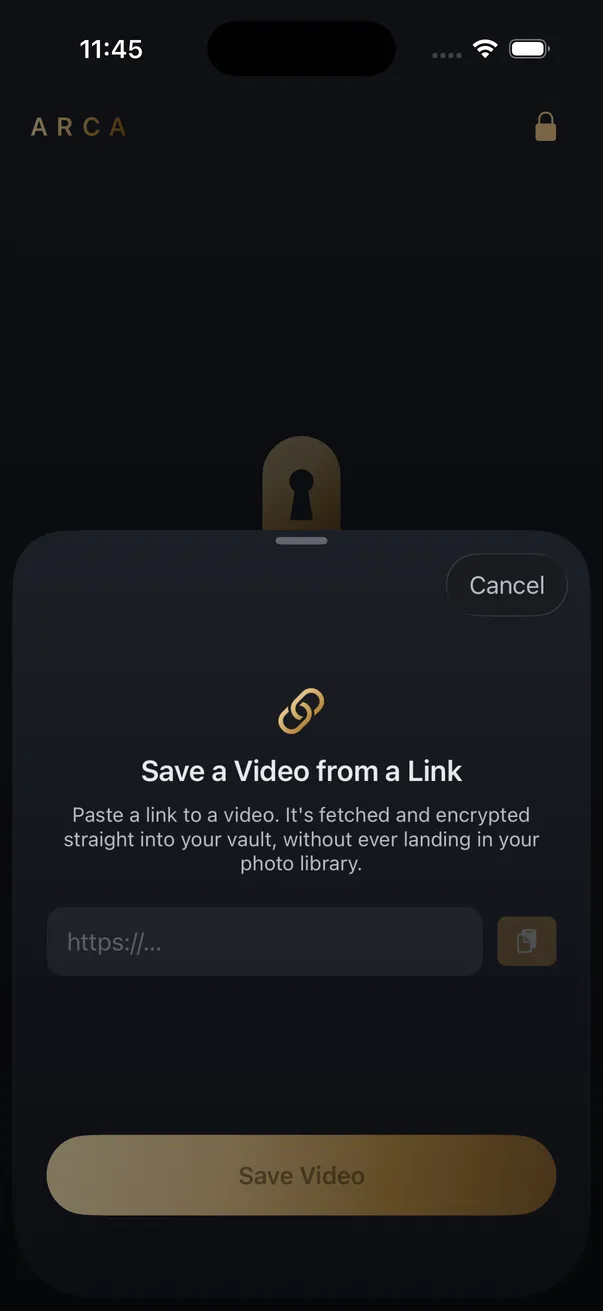
Arca is the third row of that table by design. A link you share or paste downloads straight into the encrypted vault, and the video never passes through your Camera Roll on the way in.
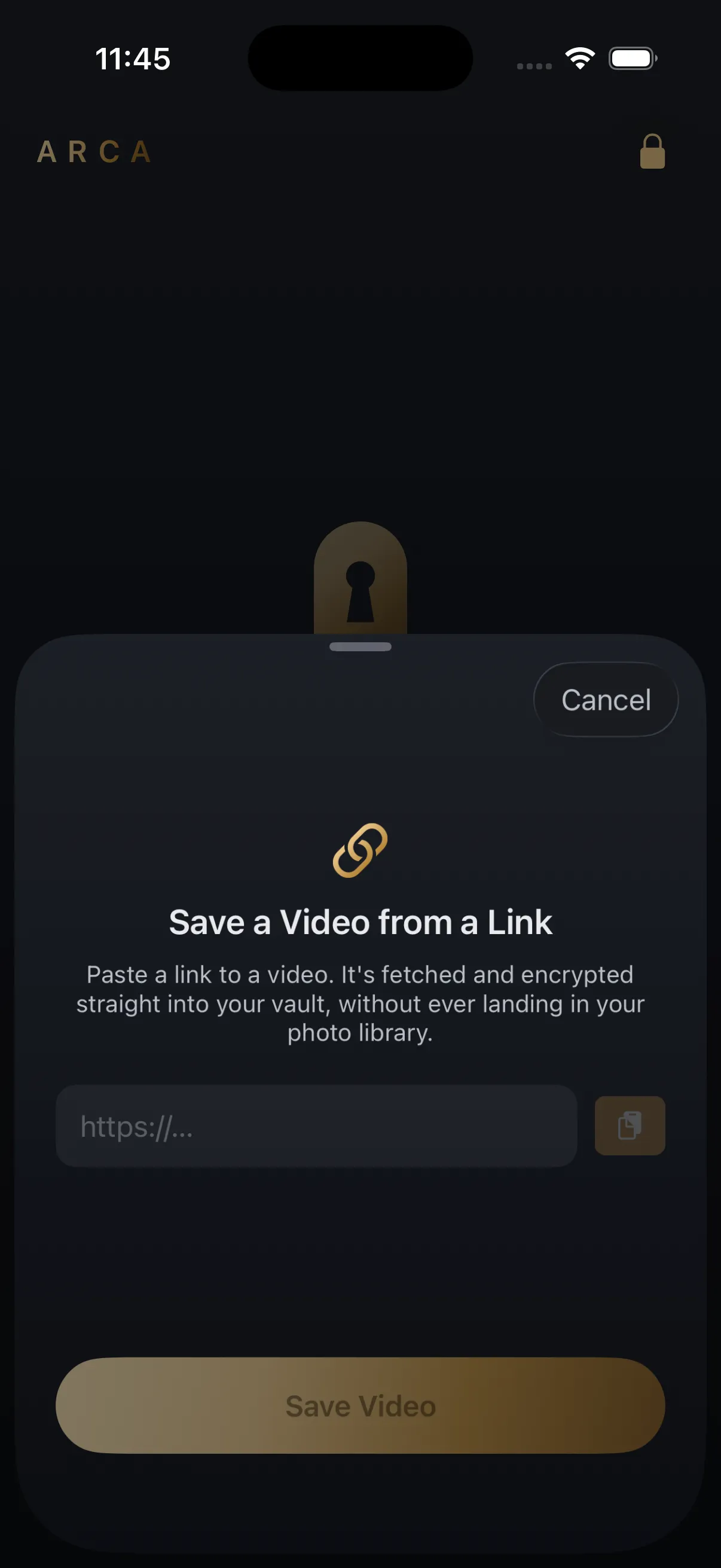
Inside the vault each file is encrypted individually with AES-256-GCM. The key is derived from your PIN using Argon2id, a deliberately slow function that makes guessing that PIN expensive rather than instant. Everything stays in the app’s container on your device, with no Arca account or hosted copy of your vault. If you might ever be pressured to unlock the app, there’s a decoy vault with its own PIN. The full model is on our security page, and the per-platform notes and limits live on the individual downloader pages such as the YouTube downloader.
The limits, stated plainly. A vault protects what you actually put in it, not what’s already sitting in your camera roll. It protects files at rest, not while one is open on screen in front of someone. We hold no recovery key or hosted vault library, so keep a backup and remember the PIN that protects it.
What happens when you delete it
Deleting behaves differently in each of the three places, and the differences matter most for the videos you most want gone.
In Photos, a deleted video moves to Recently Deleted and sits there for 30 days before it actually goes. That folder is part of your library, so anyone who can open Photos can open it. If iCloud Photos is on, the deletion syncs to your other devices, and so does the 30-day grace period.
In Files, deletion also routes through a Recently Deleted folder with the same 30-day window. A file that lived in iCloud Drive is removed from the cloud copy too, but as with any sync, other devices only catch up when they next connect.
Inside an app’s own storage, deletion is whatever the app implements, usually immediate and with no system-level recycle bin behind it. That’s a real advantage for privacy and a real hazard for accidents. Assume a deletion there is final, because it generally is.
The upshot: a video you delete from Photos or Files is still on the phone for a month unless you go and empty Recently Deleted. People routinely believe they have removed something they have not.
Finding a download you’ve already lost
Work through these in order. It’s fastest to slowest.
- Safari’s downloads list. The arrow near the address bar, if the download was recent and you haven’t cleared the list.
- Files, then Recents. Catches anything saved in the last few days regardless of folder.
- Files, then search by extension. Search “mp4” or “mov” to surface video files wherever they were filed.
- Both storage locations. On My iPhone and iCloud Drive each have their own Downloads folder, and files do not move between them.
- Photos, then Recents. If you tapped Save Video at any point, this is where it went.
- The app you used. If a downloader fetched it, check that app’s own library before assuming the file is gone.
If none of those find it, the likeliest explanation is that the download never completed. iOS quietly abandons Safari downloads if the connection drops or the app is force-closed mid-transfer, and it doesn’t leave a partial file behind to find.
A note on what you’re saving
Worth saying plainly, because most pages in this space skip it. Save what you have the right to save: your own uploads, content a platform’s own tools allow you to download, and public posts kept for your personal offline viewing. Platform terms of service still apply to you regardless of which tool you use, and nothing here is about getting around paywalls, private accounts, or age gates.
Choosing on purpose
The whole question collapses into one decision made before you download, not after.
- Want it in your library, alongside your own photos? Save Video, and accept that it syncs and surfaces like everything else there.
- Want it as a file to move around or send on? Let Safari put it in Files, and check which storage location that setting points at.
- Want it saved without it joining your camera roll? Use something that writes into its own encrypted storage, and confirm it says encrypted rather than hidden.
Most people never make this choice consciously, which is exactly why the video turns up somewhere unexpected later — either lost, or in front of someone.
Get Arca on the App Store to save videos from a link straight into an encrypted vault on your iPhone, with no automatic vault upload or Arca account.
Frequently asked questions
Why can't I find a video I downloaded on my iPhone? +
Because iPhone has no single downloads folder. A Safari download goes to whatever location Safari's Downloads setting points at, usually the Downloads folder in Files. A video you saved with the share sheet goes into Photos. A video pulled by an app often stays inside that app and never appears in either place. Check Safari's downloads list first, then search the Files app, then Recents in Photos.
Do downloaded videos show up in my Camera Roll? +
Only if something explicitly saved them there. Safari downloads land in Files, not Photos, until you open the file and tap Save Video. That extra step matters, because once a video is in Photos it is inside your main library, syncing wherever that library syncs and appearing in the same places your personal photos do.
Does downloading a video use iCloud storage? +
It can, and this catches people out. If Safari's download location is set to iCloud Drive, every file you download uploads to Apple's servers. If a video ends up in Photos and iCloud Photos is on, it syncs there too. A download only stays on the device if the destination you chose is on the device.
Keep reading
Guides
Your MP3 Downloaded. Why Isn't It in the Music App?
The file is fine. It landed in Files, and the Music app never reads Files. Here is what plays an MP3 on an iPhone, and why the converter you used was only ever doing half the job.
Guides
How to Find Where a Downloaded Video Came From
Most downloaded videos carry their source in the filename: a post ID, a shortcode or a handle. Here is how to turn each one back into the original link, and what to do when the name is gone.
Guides
Is a Reels Downloader App Safe? What to Check First
Most Reels downloader apps are not malware. The risk is in what they ask for: your Instagram login, full Photos access, a weekly subscription. Here is what to check on the App Store page before you install one.
Your photos. Truly private.
Keep your photos in an encrypted vault on your iPhone, with no Arca account or automatic vault upload.
Free to download · iPhone · iOS 18+