
Security
Forgot Your Photo Vault Password? What Recovery Means
It depends on what the password was doing. If the app only checked it at the door, a reset is usually possible. If it is the key that encrypts your photos, nobody can reset it, the developer included. How to tell which you have, what to try in order, and exactly what Arca can and cannot do.
It depends on what the password was doing. If the app only checked it at the door, a reset is usually possible, and a recovery tool may even read it out of a backup. If the password is the key that encrypts your photos, nobody can reset it, the developer included. Here is how to tell which you have.
Gate or key
Every vault app asks for a PIN. What happens after you type it is where they part ways.
A gate app keeps a copy of your PIN, or a hash of it, and compares. The PIN only decides whether the screen opens. That is why it can be reset: the app swaps the stored copy for a new one and the photos are untouched.
A key app never keeps the PIN. It runs it through a slow function to derive the key that decrypts everything, then throws the PIN away. There is nothing to compare against and nothing to email you. Forget it and the files stay ciphertext. Zero-knowledge encryption explained covers why those two properties cannot be pulled apart.
| How the app uses your PIN | Can it be reset | What that tells you |
|---|---|---|
| Compared with a stored copy | Yes, by email, support, or a backup tool | The photos were readable without it |
| Turned into the encryption key | No, not by anyone | The PIN was the only thing keeping them closed |
What to try, in order
- Look at the lock screen. Gate apps put a Forgot PIN link there, or show one after a few wrong tries, and email a reset to the address you gave at setup.
- Try Face ID or Touch ID if the app offered it. Biometric unlock is a second door, and it often still works when the PIN is gone.
- Check the app’s support page. Some ask for proof of purchase. A key app will say plainly that it cannot help, and that is honesty, not a brush-off.
- Do not delete the app hoping for a fresh start. The vault goes with the app, and restoring an iPhone backup brings the same lock back, not a way past it.
One more route is worth understanding rather than using. Backup-browser vendors advertise reading a vault app’s PIN straight out of an iPhone backup, encrypted or not. That only works when the app stored the PIN somewhere the tool can find it. If a stranger holding your backup could recover your PIN, the PIN was never what stood between them and your photos.
What Arca does when you forget
Arca is a key app. Your PIN goes through Argon2id and comes out as the key that unwraps the vault key, then it is discarded. There is no reset and no recovery email, because there is no copy to send. The security page says it in the same words.
What you can still do depends on how you set unlocking up.
- Face ID or PIN. Face ID opens the vault through a key held in the Secure Enclave, so a forgotten PIN is not final yet. Open the vault with Face ID and export your originals before anything else. Changing the PIN asks for the current one, Erase All does too, and a
.arcavaultbackup only restores with the PIN that made it. Once the originals are out, delete the app and set it up again with a PIN you will keep. - PIN only, or Face ID then PIN. The PIN is the only key path. Nothing we can do changes that.
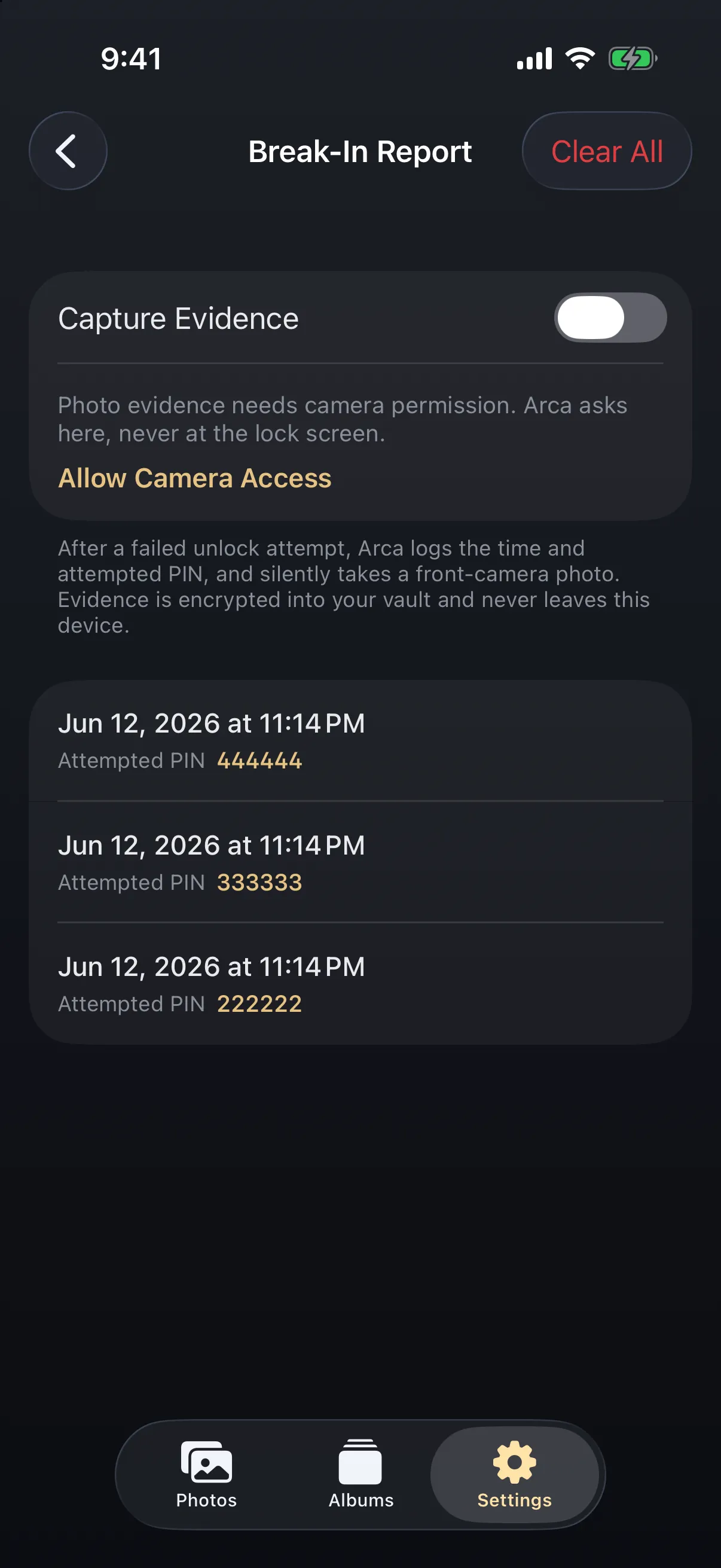
Guessing has a cost. After five wrong tries the keypad waits 30 seconds, and the wait doubles each time up to eight minutes. Every miss is also written into the Break-In Report with the time and the digits you typed, plus a front-camera photo if Capture Evidence is on. Expect to find your own face in it.
One check before you give up: if Arca opened but showed a vault you do not recognise, you typed your decoy PIN. The decoy has its own PIN and the same lock screen, on purpose.
Before you forget it
The fix is cheap now and impossible later. Keep the PIN in a password manager you already trust. Turn on Face ID or PIN so there is a second door. Keep a .arcavault export for the day the phone is lost, knowing it opens with the same PIN and nothing else.
Frequently asked questions
Can Arca reset my PIN if I forget it? +
No. The PIN is never stored. It is turned into the key that opens the vault and then discarded, so there is no copy to email and nothing we could reset even if asked. If Face ID or PIN mode is on, Face ID still opens the vault and you can export your originals.
Can a recovery tool read my Arca PIN out of an iPhone backup? +
No. Tools that pull a vault PIN from a backup depend on the app having stored it. Arca stores no PIN, only encrypted files and a wrapped key, so a backup gives a tool nothing to read.
Does a .arcavault backup help if I forget my PIN? +
No. The backup is sealed with the same key and restores only with the PIN that made it. It protects you against losing the phone, not against losing the PIN.
Keep reading
Privacy
What Happens to Your Photos If You Delete a Photo Vault App?
The app's data goes with the app. Vault photos live in the app's own container, not in Photos, so removing the app removes them. Whether you get them back depends on something you did before you tapped delete.
Security
Is Your Photo Vault Included in Your iPhone Backup?
Every no-server app tells you to keep your own backup, and almost none explain what your iPhone backup already does or doesn't contain. The answer decides whether a restored phone gives you your vault back.
Guides
How to Move Your Private Photos to a New iPhone
iCloud photos move themselves to a new iPhone, but that means they live in the cloud. Photos kept off the cloud, or in a vault, need a deliberate local move. Here's how to transfer private photos without exposing them.
Your photos. Truly private.
Keep your photos in an encrypted vault on your iPhone, with no Arca account or automatic vault upload.
Free to download · iPhone · iOS 18+