
Guides
Can You Download a YouTube Playlist as MP3 on iPhone?
Not in one step. Downloaders take one video at a time, and a playlist link has no video in it. What each link type returns, where the rights question lands, and the fastest way to work through a playlist by hand.
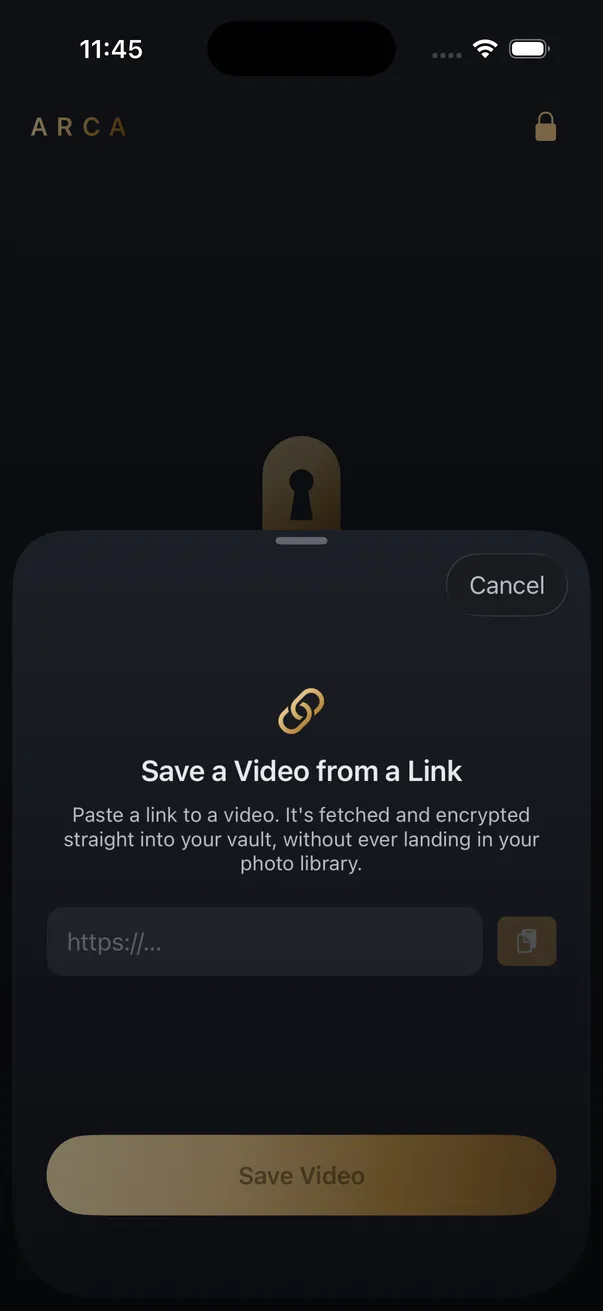
Not in one step. Downloaders take one video at a time, and a playlist link contains no video, so it fails. On iPhone the realistic route is link by link: the YouTube to MP3 page for audio files, or Arca’s share queue for videos kept in an encrypted vault. The only playlist download YouTube’s terms allow is Premium’s offline mode.
What happens when you paste a playlist link
A playlist URL is youtube.com/playlist followed by a list ID. There is no video ID anywhere in it, and a downloader needs a video to fetch, so the YouTube to MP3 page reports the link as unsupported. Nothing downloads, not even the first track.
A watch link copied from inside a playlist is different. It carries a video ID and a list parameter, and the video ID wins. You get that one track and the list part is ignored. The same rule holds on SoundCloud, where a set or an artist page is rejected and a single track works.
| Link you paste | What comes back |
|---|---|
| youtube.com/playlist?list=… | Unsupported, nothing downloads |
| youtube.com/watch?v=…&list=… | That one video, list ignored |
| youtu.be short link | That one video |
| SoundCloud set or artist page | Unsupported |
| SoundCloud single track | One MP3 |
The rights question comes first
YouTube’s terms allow downloading only through YouTube’s own features. Premium’s offline mode is the one that handles whole playlists, and it keeps them inside the YouTube app. If the playlist is commercially released music you do not own, that is the answer, and a converter does not change it. A converter is for material you already have the right to keep: your own uploads, or something published under a licence that allows it, like a Creative Commons lecture series. The platform’s terms still apply to you either way.
Link by link: the two routes on iPhone
For MP3 files, use the web page. Paste each track’s link and the MP3 downloads through Safari into your Files app. MP3 or MP4 covers when audio alone is the better choice.
For a playlist that stays private, use Arca’s share extension. It accepts a link in about a second and defers the download, which is what makes a long playlist bearable.
- Open the playlist in the YouTube app or Safari.
- On each video, tap Share, then Arca. The extension shows “Saved for later” and you are back in the playlist.
- Repeat for every track you want. Nothing downloads yet.
- Open Arca and unlock the vault. The queued links resolve and download in turn, with a banner counting 1 of 8, 2 of 8, and so on.
- Select the finished files and move them into an album named after the playlist.
Arca saves the video rather than an audio-only file. The audio is intact, and for a talk or a lecture the picture is usually worth keeping.
Where the files end up
In Arca, each download is encrypted on the phone with AES-256-GCM under a key derived from your PIN with Argon2id, and it never passes through the Camera Roll or the Files app. The resolver that fetches each link sees that link, the same as with any downloader, and the finished file exists only inside your vault, with no account and no cloud copy. Save from Link is part of Arca’s paid tier. Files from the web page land in the Files app instead, where anything with access to your phone can read them. For a lecture series, nobody cares. For anything personal, that is the reason the vault exists.
Frequently asked questions
Does a watch link with &list= in it download the whole playlist? +
No. The video ID in the link is what gets resolved and the list parameter is ignored. You get that one video, or its audio as MP3, and nothing else from the playlist.
How many links can I queue in Arca at once? +
There is no set count. Each link you share is staged by the extension and downloaded the next time you unlock the main vault, one after another, with a progress banner showing how many remain.
Can YouTube Premium download a whole playlist? +
Yes, inside the YouTube app. Premium's offline mode saves videos and playlists for playback in the app itself. It does not produce MP3 files you can move elsewhere, and it is the only playlist download YouTube's terms permit.
Keep reading
Guides
Your MP3 Downloaded. Why Isn't It in the Music App?
The file is fine. It landed in Files, and the Music app never reads Files. Here is what plays an MP3 on an iPhone, and why the converter you used was only ever doing half the job.
Guides
Which Link Should You Copy to Download a Video?
Whatever the Share menu hands you, tracking tail and all. The links that fail are failing for a different reason: they point at a playlist, a profile, or something behind a login. Here is the shape each platform expects.

Guides
Can You Download a Whole Instagram Carousel?
Yes, but not as one file. A carousel is several separate photos and videos behind a single URL, so a downloader returns them as items you pick from. What each slide type gives you, and why the sites promising a one-click zip are building it themselves.
Your photos. Truly private.
Keep your photos in an encrypted vault on your iPhone, with no Arca account or automatic vault upload.
Free to download · iPhone · iOS 18+